Chapter 1: System Components
A detailed breakdown of every component in the segmentation architecture, its zone placement, inputs/outputs, and engineering KPIs.
1.1 System Architecture
The component-level architecture organizes security enforcement and operational tooling into discrete zones, each with a defined trust boundary. Inter-zone traffic must traverse defined enforcement points — either a Next-Generation Firewall (NGFW), an Internal Segmentation Firewall (ISFW), a distributed firewall, or a segmentation gateway. Optional boundary controls such as service mesh policy, DLP, database audit, and data tokenization may be layered on top of the mandatory enforcement points for environments with higher sensitivity or compliance requirements.
Support dependencies that underpin the entire architecture include time synchronization (NTP hierarchy), DNS hierarchy with conditional forwarding, certificate/PKI infrastructure, backup systems, and centralized monitoring. These are not optional — without NTP, log correlation becomes unreliable; without PKI, TLS inspection and certificate-based authentication cannot function.
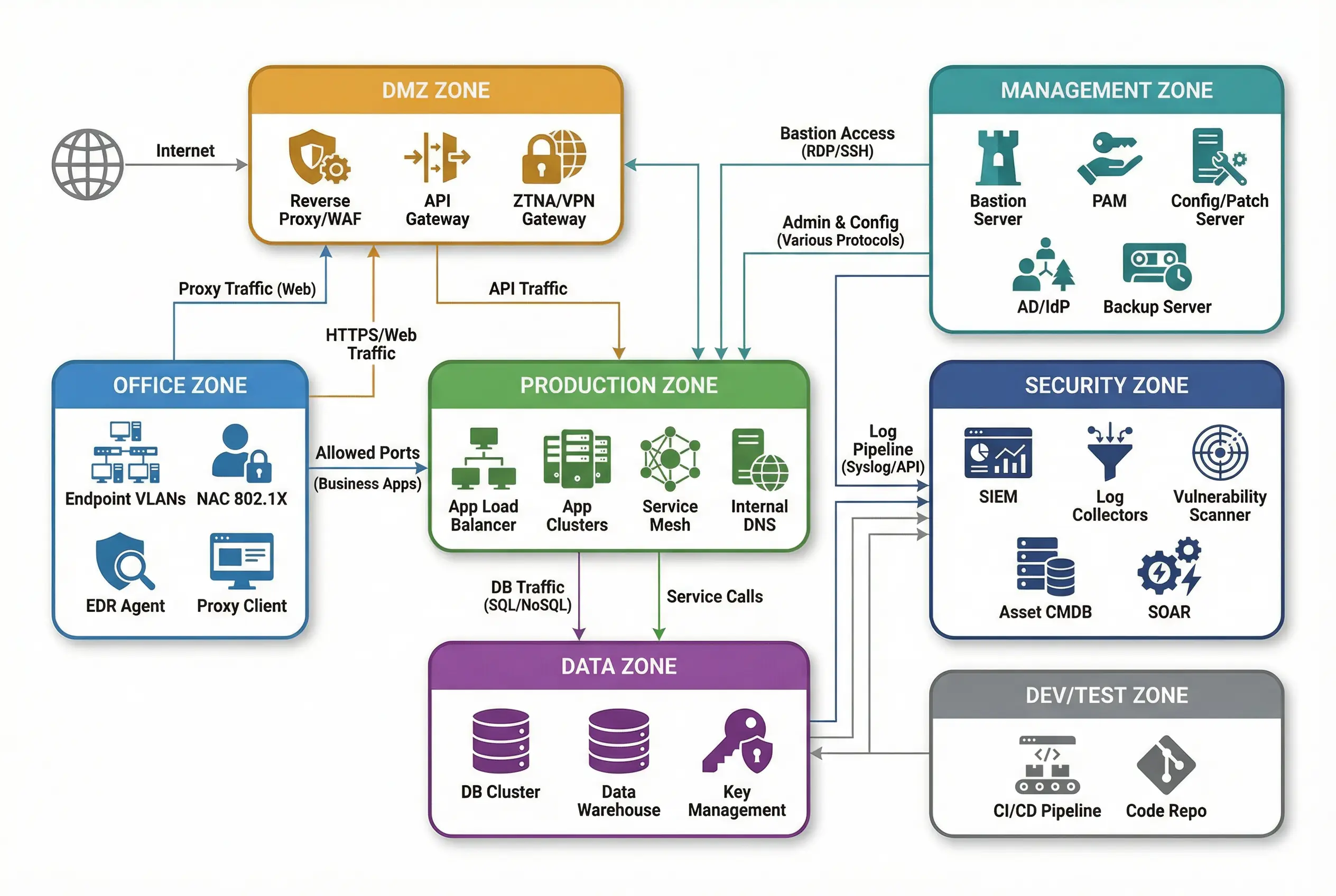
Figure 1.1: Component-Level Architecture Diagram — Zone boxes showing components within each zone (DMZ, Office, Production, Data, Management, Security, Dev/Test) with traffic flow arrows indicating enforcement paths between zones.
Core and Optional Boundary Controls
- Core boundary (mandatory): Inter-zone traffic must traverse defined enforcement points — NGFW/ISFW/segmentation gateway or distributed firewall.
- Optional boundary: Service mesh policy, DLP, DB audit, data tokenization, deception systems.
- Support dependencies: Time sync (NTP), DNS hierarchy, certificate/PKI, backup, monitoring.
1.2 Components and Functions
The component inventory maps each security and operational tool to its recommended zone, defines its primary responsibility, and specifies the key performance indicators (KPIs) that must be validated during acceptance testing. Mismatches between component sizing and actual workload are a leading cause of security failures and operational incidents — the table below captures the most critical mismatch risks for each component.
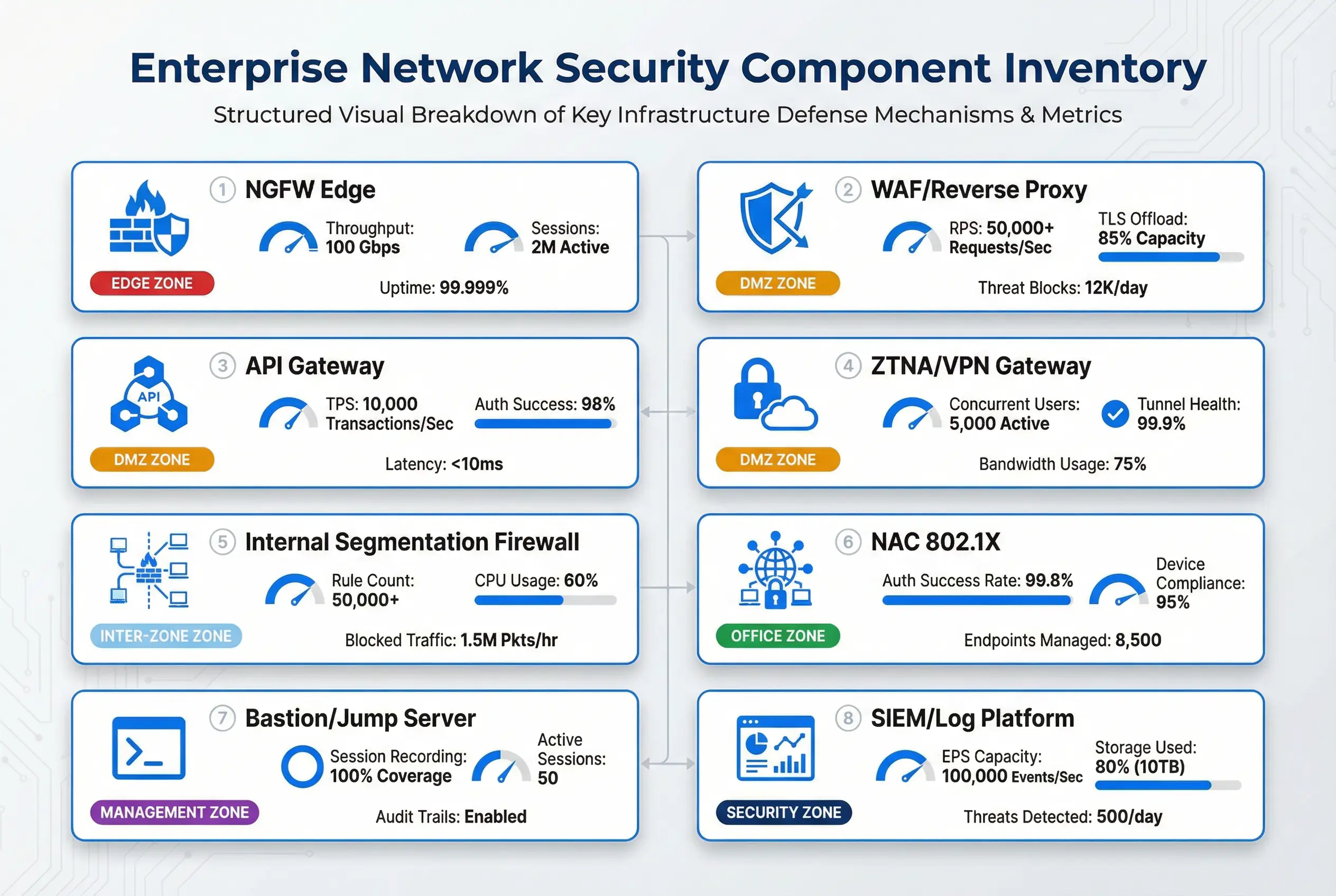
Figure 1.2: Component Inventory Map — Visual grid showing each security component with its zone badge, key KPI gauges, and performance metrics for rapid reference during design and acceptance reviews.
Table 1-1: Component Responsibilities and Engineering KPIs
| Component | Recommended Zone | Primary Responsibility | Key KPIs (Typical) | Mismatch / Failure Risk |
|---|---|---|---|---|
| NGFW (Internet Edge) | Internet ↔ DMZ | North–south boundary, NAT, IPS policy | Throughput at peak, session capacity, latency, HA failover <30s | Under-sizing causes packet loss; bad HA causes outage |
| WAF / Reverse Proxy | DMZ | L7 protection, TLS termination, virtual hosting | RPS capacity, TLS offload, false positive rate | Misrules block business; no TLS policy weakens security |
| API Gateway | DMZ / Prod Edge | API auth, rate limit, routing | TPS, auth latency, error rate | No rate limiting enables API abuse; missing auth exposes data |
| ZTNA / VPN Gateway | DMZ | Identity-based remote access | Concurrent users, auth success rate | Split tunneling misconfig leads to data leak |
| Internal Segmentation Firewall (ISFW) | Inter-zone | East–west zone boundary enforcement | Rule hit ratio, CPU, HA stability | Rule sprawl becomes unmanageable; bypass enables lateral movement |
| NAC (802.1X) | Access / Office | Device admission control | Auth success rate, rogue device rate | Bypass = unmanaged devices inside the network |
| Bastion / Jump Server | Management | Privileged access chokepoint | Session recording coverage, MFA usage rate | Direct admin paths bypass audit and enable privilege abuse |
| SIEM / Log Platform | Security | Central collection & correlation | EPS capacity, log completeness (%) | Missing logs break detection and compliance evidence |
| Vulnerability Scanner | Security | Asset scan and exposure analysis | Coverage %, scan success rate | Over-scanning causes outage; no credential scan misses issues |
| Database Audit (optional) | Data | Sensitive query auditing | Coverage %, noise ratio | Mis-tuned generates overload/noise; missing = compliance gap |
1.3 Working Principles
Startup Flow
The correct sequence for bringing up a segmented environment is critical — each step builds on the previous one, and skipping steps creates security gaps that are difficult to detect after the fact. The startup flow must be followed in order:
- Establish zone definitions and domain ownership.
- Build enforcement points (edge NGFW, ISFW/distributed firewall, proxy/gateway).
- Create a baseline deny policy between zones, then allowlist required flows.
- Onboard identity (MFA, privileged access) and log pipeline (time sync first).
- Perform staged cutover with rollback plans.
Normal Operation
During steady-state operation, all inter-zone traffic follows the defined conduits. Office users access internal applications via published paths (proxy/API gateway) or direct allowlisted ports where justified and documented. Admin operations occur exclusively via bastion/PAM — no direct RDP/SSH from Office to servers is permitted. Production services call Data via limited DB ports with service accounts, monitored by DB audit and DLP where required. The SOC receives logs from all zones, and alerts trigger SOAR playbooks for automated or semi-automated response.
Exception and Recovery
Exceptions to the default-deny baseline must have a ticket ID, owner, expiry date, and compensating controls. No exception should be open-ended or unreviewed. The following abnormal chains illustrate how the architecture responds to real-world incidents:
| Abnormal Chain | Observable Behavior | Automated Control Response | Manual Response |
|---|---|---|---|
| Office endpoint compromised → lateral scan attempt | Scanning Production subnet; SMB/RDP attempts to server IPs | Office→Production denied by default; IDS triggers; SIEM alert; NAC can quarantine host | Investigate endpoint; rotate credentials; review lateral movement scope |
| Misconfigured firewall change blocks business | Sudden drop in successful app access; user complaints | Synthetic probes detect failure; change window + staged deployment + rollback | Monitor rule hit counters; restore previous policy set; post-incident review |
| Credential theft → privileged access attempt | Admin login from unusual device/time/location | MFA + device posture check blocks access; bastion session recording; SIEM UEBA alert | Disable account; rotate keys; forensic review of bastion logs |