Chapter 5: Selection & Interfaces
Core product introduction, typical wiring and interface logic, and a comprehensive product function comparison table for all key segmentation components.
5.1 Core Product Introduction
The segmentation architecture relies on a set of core security appliances and software platforms, each fulfilling a specific enforcement or visibility function. Product selection must be driven by the technical requirements derived from the zone design — throughput, session capacity, feature set, and operational integration requirements — rather than by vendor preference alone. The following six product categories represent the minimum viable set for a complete segmentation deployment.
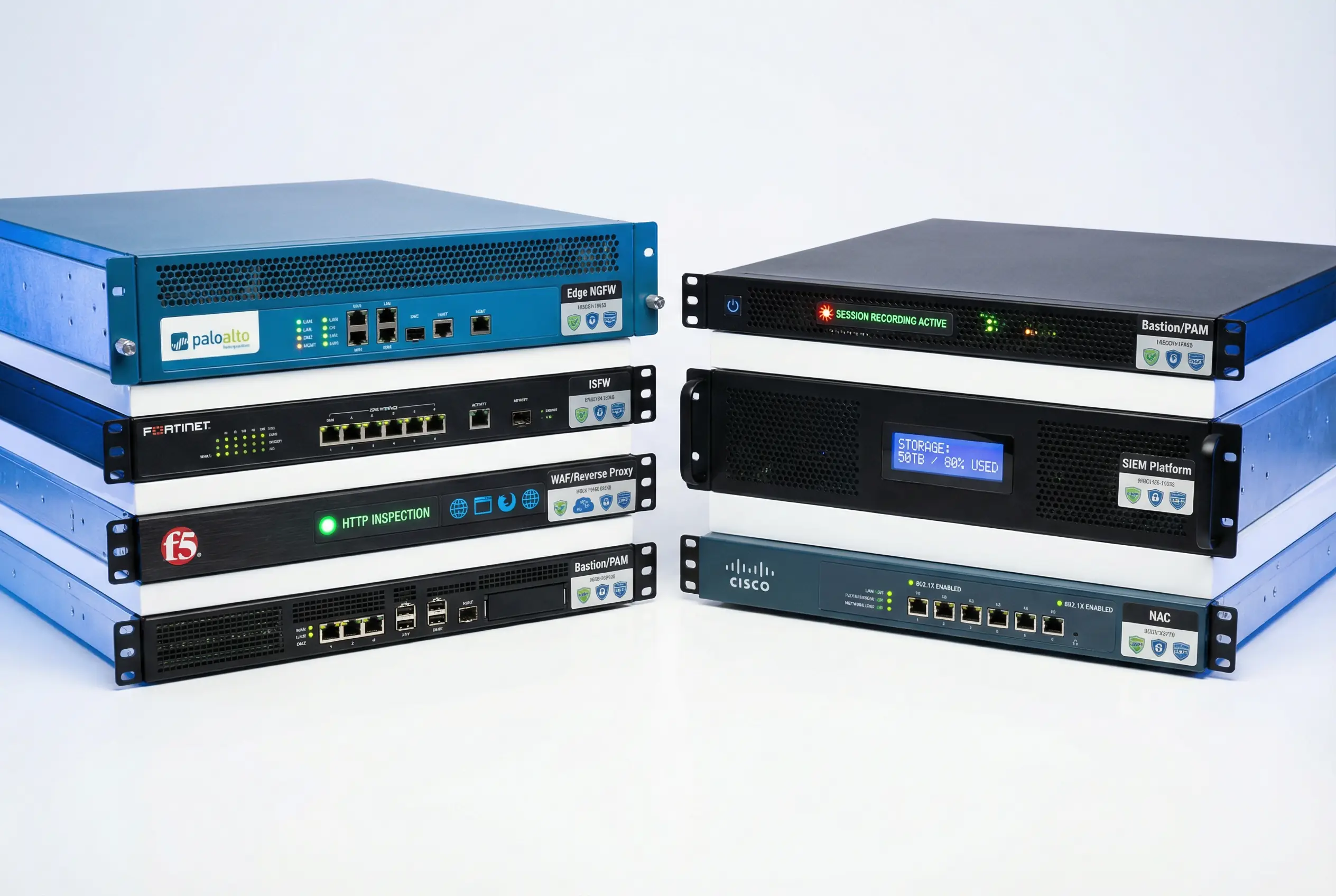
Figure 5.1: Core Security Product Lineup — Six key security appliances: Edge NGFW (Palo Alto style), ISFW (Fortinet style), WAF/Reverse Proxy (F5 style), Bastion/PAM server with session recording indicator, SIEM Platform with storage capacity display, and NAC appliance (Cisco ISE style) with 802.1X indicator.
Table 5-1: Core Product Functions and Selection Criteria
| Product Category | Zone Placement | Core Functions | Key Selection Criteria | Typical Form Factor | HA Requirement |
|---|---|---|---|---|---|
| Edge NGFW | Internet ↔ DMZ | Stateful inspection, IPS/IDS, NAT, SSL inspection, application control, URL filtering, threat intelligence | Throughput at SSL inspection on, session capacity, IPS performance, HA failover time, management API | 2U rack appliance (HA pair) | Active-Passive or Active-Active |
| WAF / Reverse Proxy | DMZ | L7 HTTP/HTTPS inspection, OWASP Top 10 protection, TLS termination, virtual hosting, bot management, API protection | RPS capacity, TLS offload performance, false positive rate, learning mode accuracy, API gateway integration | 1–2U appliance or VM cluster | Active-Active cluster |
| ISFW (Internal Segmentation FW) | Inter-zone boundaries | East-west zone enforcement, stateful inspection, application-aware policy, micro-segmentation support | East-west throughput, latency at line rate, rule capacity, VXLAN/overlay support, distributed FW integration | 1U appliance (HA pair) | Active-Passive or Active-Active |
| Bastion / PAM | Management zone | Privileged session proxy, MFA enforcement, session recording, credential vaulting, just-in-time access, audit trail | Protocol support (SSH/RDP/VNC/DB), recording storage, MFA integration, SIEM integration, concurrent session capacity | 1U appliance or VM | Active-Passive with shared storage |
| SIEM Platform | Security zone | Log collection and normalization, correlation rules, alerting, threat hunting, compliance reporting, SOAR integration | EPS (events per second) capacity, storage retention, correlation rule library, SOAR integration, search performance | 2–4U appliance or distributed cluster | Cluster (3+ nodes) |
| NAC (802.1X) | Access layer / Office zone | Device authentication, posture assessment, VLAN assignment, guest portal, rogue device detection, endpoint profiling | Concurrent endpoint capacity, posture check coverage, guest workflow, switch/AP vendor compatibility, MDM integration | 1U appliance or VM cluster | Active-Passive or cluster |
5.2 Typical Wiring and Interface Logic
The interface assignment design maps each physical port on a security appliance to a specific zone, with a defined trust level and a set of permitted traffic flows. Correct interface assignment is critical — a misconfigured interface that places a high-trust zone on the wrong port can create an undetected security gap that persists for years. The interface logic diagram below shows the standard port assignments for both the edge NGFW and the ISFW, including the HA sync port, out-of-band management port, and data plane ports.
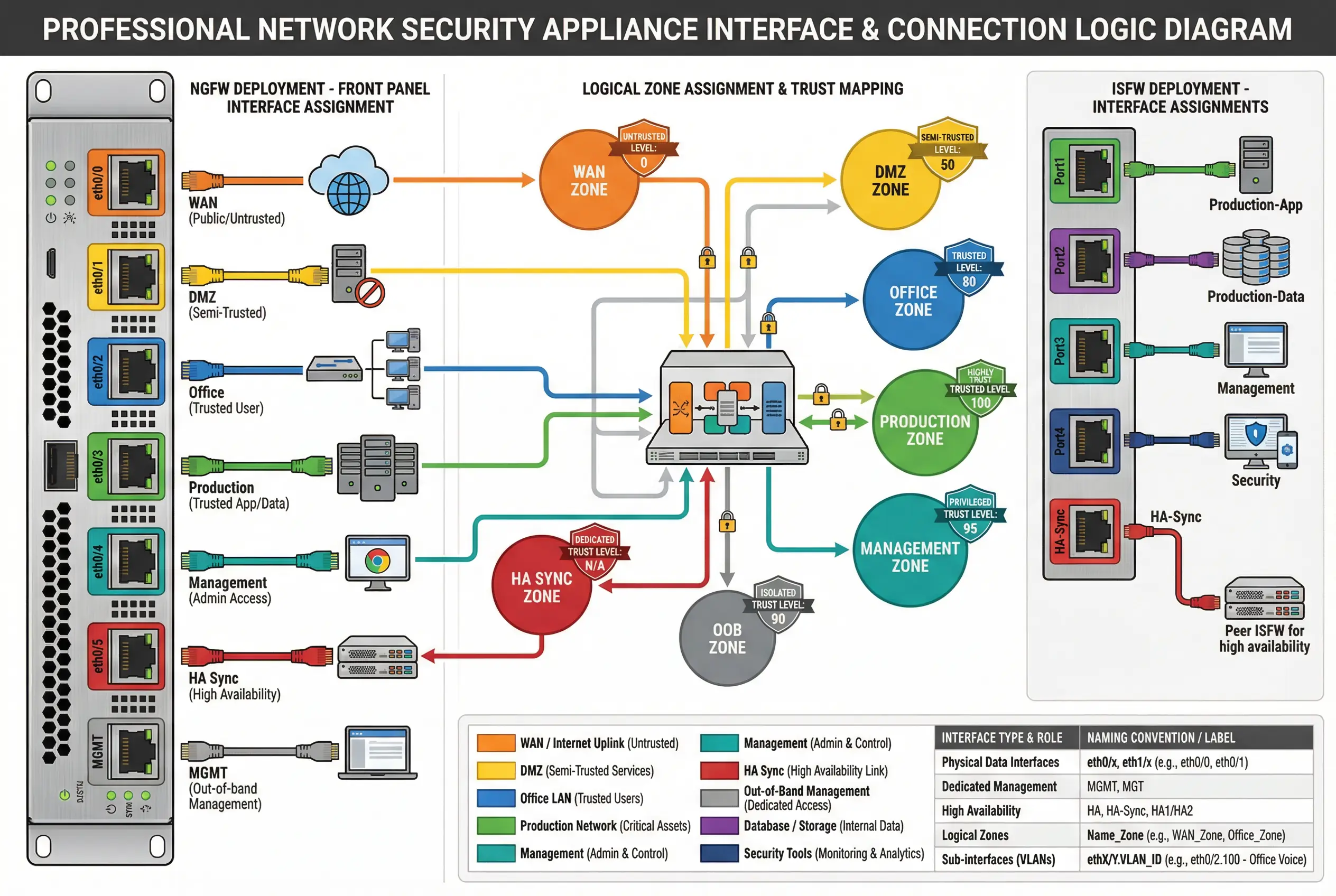
Figure 5.2: Interface and Connection Logic Diagram — NGFW front panel showing physical port assignments (WAN/orange, DMZ/yellow, Office/blue, Production/green, Management/teal, HA Sync/red, OOB MGMT/gray) with logical zone assignment mapping and trust level badges, plus ISFW interface assignments on the right panel.
Table 5-2: NGFW Interface Assignment Reference
| Interface | Zone Assignment | Trust Level | Cable Color | Speed | Notes |
|---|---|---|---|---|---|
| eth0/0 | WAN / Internet | 0 (Untrusted) | Orange | 1–10Gbps | Dual ISP if available; no private IPs |
| eth0/1 | DMZ | 30 (Semi-trusted) | Yellow | 1–10Gbps | Connects to DMZ switch; WAF/proxy behind |
| eth0/2 | Office / User | 50 (Low-Medium) | Blue | 1–10Gbps | Connects to Office core switch |
| eth0/3 | Production | 70 (Medium) | Green | 10–25Gbps | Connects to Production ISFW or core switch |
| eth0/4 | Management | 90 (Privileged) | Teal | 1Gbps | Connects to Management zone switch |
| eth0/5 | HA Sync | N/A | Red | 1–10Gbps | Direct cable to HA peer; no switch in path |
| MGMT | OOB Management | 90 (Privileged) | Gray | 1Gbps | Dedicated OOB management network |
Table 5-3: ISFW Interface Assignment Reference
| Interface | Zone Assignment | Trust Level | Cable Color | Speed | Notes |
|---|---|---|---|---|---|
| Port1 | Production-App tier | 70 (Medium) | Green | 10–25Gbps | Application servers; load balancer uplink |
| Port2 | Production-Data tier | 85 (High) | Purple | 10–25Gbps | Database cluster; storage systems |
| Port3 | Management | 90 (Privileged) | Teal | 1Gbps | Bastion/PAM access only |
| Port4 | Security / SOC | 90 (Visibility) | Dark Blue | 1–10Gbps | Log push to SIEM; scanner reach |
| HA-Sync | HA Synchronization | N/A | Red | 1–10Gbps | Direct cable to ISFW peer |
5.3 Core Product Function Comparison Table
The following comprehensive function table compares the capabilities of the six core product categories across the dimensions most relevant to segmentation deployments. This table is intended to support vendor evaluation and RFP development — each row represents a capability that should be verified during proof-of-concept testing.
| Function / Capability | Edge NGFW | WAF | ISFW | Bastion/PAM | SIEM | NAC |
|---|---|---|---|---|---|---|
| Stateful packet inspection | ✓ Core | ✓ L7 | ✓ Core | — | — | — |
| IPS / threat prevention | ✓ Full | ✓ Web | ✓ Partial | — | — | — |
| SSL/TLS inspection | ✓ Full | ✓ Full | ✓ Partial | — | — | — |
| Application identification | ✓ Full | ✓ HTTP | ✓ Partial | — | — | — |
| URL / category filtering | ✓ Full | ✓ Partial | — | — | — | — |
| MFA enforcement | ✓ VPN | ✓ Web | — | ✓ Core | — | ✓ 802.1X |
| Session recording | — | — | — | ✓ Core | — | — |
| Credential vaulting | — | — | — | ✓ Core | — | — |
| Log collection | ✓ Self | ✓ Self | ✓ Self | ✓ Self | ✓ All sources | ✓ Self |
| Correlation / alerting | — | — | — | — | ✓ Core | — |
| Device posture check | ✓ Partial | — | — | ✓ Partial | — | ✓ Core |
| VLAN / zone assignment | ✓ NGFW zones | — | ✓ ISFW zones | — | — | ✓ Dynamic VLAN |
| API / automation interface | ✓ REST/XML | ✓ REST | ✓ REST | ✓ REST | ✓ REST/Syslog | ✓ REST/RADIUS |
| HA / clustering | ✓ A/P + A/A | ✓ Cluster | ✓ A/P + A/A | ✓ A/P | ✓ Cluster | ✓ A/P + Cluster |
| Compliance reporting | ✓ Partial | ✓ Partial | ✓ Partial | ✓ Full | ✓ Full | ✓ Partial |