Chapter 7: Supporting Systems
Identity management, DNS, NTP, PKI, IPAM, backup, change management, and monitoring — the eight supporting systems that make segmentation operationally sustainable.
A segmentation architecture is only as strong as its supporting systems. The core security appliances enforce the policy, but without reliable identity management, accurate time synchronization, trusted certificate infrastructure, and disciplined change management, the policy enforcement will degrade over time. This chapter describes the eight supporting systems that must be designed and operated alongside the core segmentation infrastructure. The integrated diagram below shows how all supporting systems connect to the core security architecture.
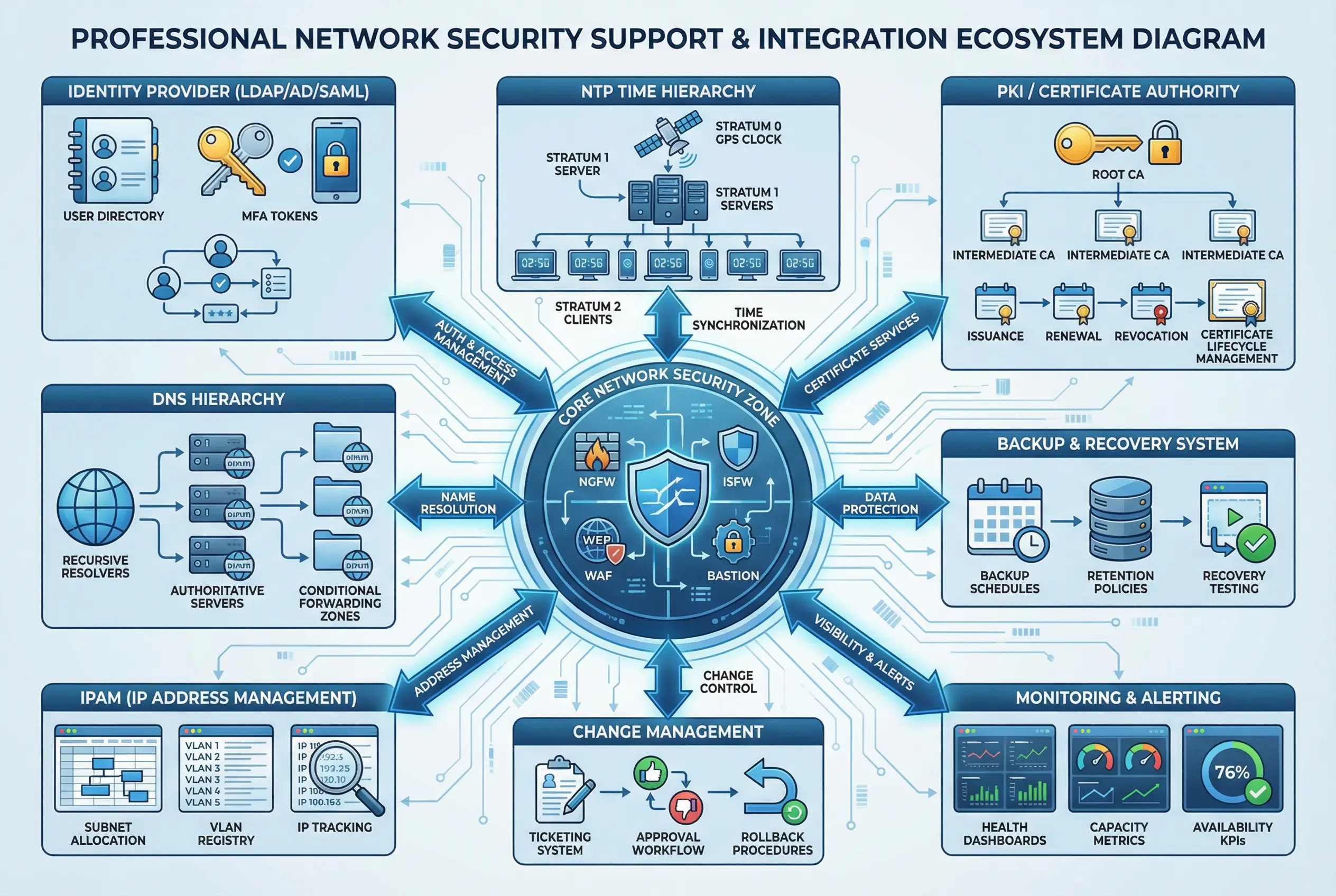
Figure 7.1: Integrated Supporting Systems Ecosystem — Hub-and-spoke diagram showing the core network security zone (NGFW, ISFW, WAF, Bastion) at center, connected to all eight supporting systems: Identity Provider (LDAP/AD/SAML), NTP Time Hierarchy, PKI/Certificate Authority, DNS Hierarchy, Backup & Recovery, IPAM, Change Management, and Monitoring & Alerting.
7.1 Identity and Access Management Integration
Every security appliance in the segmentation architecture must integrate with the enterprise identity provider (IdP) for authentication and authorization. Local accounts should be used only for break-glass emergency access. The IdP integration ensures that when a user account is disabled in the directory, access to all security appliances is revoked simultaneously — a critical control for offboarding scenarios.
| Integration Point | Protocol | Authentication Method | Authorization Source | MFA Required |
|---|---|---|---|---|
| NGFW admin access | LDAP / RADIUS | Username + password + MFA | AD security group | Yes |
| ISFW admin access | LDAP / RADIUS | Username + password + MFA | AD security group | Yes |
| Bastion / PAM | LDAP / SAML | Username + password + MFA | PAM policy + AD group | Yes |
| VPN / ZTNA gateway | SAML / RADIUS | Certificate + MFA | AD group + device policy | Yes |
| SIEM platform | LDAP / SAML | Username + password + MFA | SIEM role + AD group | Yes |
| NAC (802.1X) | RADIUS + LDAP | EAP-TLS (certificate) | AD group → VLAN policy | Device cert |
| Guest portal | Captive portal | Email/SMS OTP | Time-limited guest policy | OTP |
7.2 NTP Time Synchronization Hierarchy
Accurate time synchronization is a foundational requirement for security operations. Log correlation, certificate validity, Kerberos authentication, and forensic investigation all depend on all devices having consistent, accurate timestamps. A time drift of more than a few seconds can cause Kerberos authentication failures and make log correlation unreliable. The NTP hierarchy must be designed with redundancy and must be monitored continuously.
| NTP Stratum Level | Device Type | Time Source | Redundancy | Max Allowed Drift |
|---|---|---|---|---|
| Stratum 0 | GPS / atomic clock reference | GPS satellite | Dual GPS receivers | N/A (reference) |
| Stratum 1 | Internal NTP servers (2–3) | Stratum 0 GPS devices | Minimum 2 servers | <1ms |
| Stratum 2 | All security appliances, servers | Internal Stratum 1 servers | Configure 2+ NTP sources | <100ms |
| Stratum 3 | Endpoint devices, IoT | Internal Stratum 2 servers | Single source acceptable | <1s |
7.3 PKI and Certificate Management
A private PKI is required for issuing certificates for TLS inspection, device authentication (802.1X EAP-TLS), admin authentication, and inter-service communication. The PKI must be designed with a two-tier hierarchy — an offline root CA and one or more online issuing CAs. The root CA private key must be stored in a hardware security module (HSM) and the root CA system must be kept offline except during issuing CA certificate renewal operations.
| Certificate Use Case | Issuing CA | Key Algorithm | Validity Period | Auto-Renewal |
|---|---|---|---|---|
| TLS inspection (NGFW/WAF) | Internal Issuing CA | RSA-2048 or ECDSA P-256 | 2 years | Yes (ACME or SCEP) |
| Device certificates (802.1X) | Internal Issuing CA | RSA-2048 or ECDSA P-256 | 1 year | Yes (SCEP/MDM) |
| Admin authentication | Internal Issuing CA | RSA-2048 | 1 year | Manual renewal |
| Inter-service TLS | Internal Issuing CA | ECDSA P-256 | 90 days | Yes (ACME) |
| Root CA certificate | Self-signed (offline) | RSA-4096 | 20 years | Manual (planned) |
7.4 DNS Architecture
The DNS architecture must be designed to support the zone model. Each zone should have its own DNS resolver configuration, and DNS queries from higher-security zones should not be forwarded to resolvers in lower-security zones. The DNS architecture must prevent DNS-based data exfiltration through query monitoring and response policy zones (RPZ).
- Split-Horizon DNS: Internal DNS resolvers return internal IP addresses for internal service names; external DNS returns public IPs. This prevents internal IP address disclosure.
- DNS Filtering: All DNS queries from Office and DMZ zones must pass through a DNS security service that blocks queries to known malicious domains using threat intelligence feeds.
- Response Policy Zones (RPZ): Configure RPZ on internal resolvers to block DNS resolution of known C2 domains, phishing domains, and newly registered domains matching suspicious patterns.
- DNS Query Logging: All DNS queries must be logged and forwarded to the SIEM. DNS logs are one of the most valuable data sources for detecting lateral movement and data exfiltration.
- DNSSEC: Implement DNSSEC for all internally authoritative zones to prevent DNS spoofing attacks within the network.
7.5 IP Address Management (IPAM)
An IPAM system is essential for maintaining an accurate, up-to-date record of all IP address allocations across all zones. Without IPAM, firewall rules based on IP addresses will drift from reality as addresses are reassigned, and security incidents will be harder to investigate because the mapping between IP addresses and devices will be unknown. The IPAM system must be integrated with DHCP servers, DNS, and the CMDB to provide a single source of truth for IP address assignments.
| Zone | Subnet Range | Address Assignment | DHCP Scope | Reserved Ranges |
|---|---|---|---|---|
| DMZ | 10.0.10.0/24 | Static (servers) | None | .1–.10 (infrastructure) |
| Office | 10.0.20.0/22 | DHCP (endpoints) | .50–.250 | .1–.49 (printers, phones) |
| Production | 10.0.30.0/24 | Static (servers) | None | .1–.10 (infrastructure) |
| Data | 10.0.40.0/24 | Static (DB servers) | None | .1–.10 (infrastructure) |
| Management | 10.0.50.0/24 | Static (bastion, PAM) | None | .1–.10 (infrastructure) |
| Security | 10.0.60.0/24 | Static (SIEM, SOAR) | None | .1–.10 (infrastructure) |
| Guest | 192.168.100.0/22 | DHCP (guests) | .50–.250 | .1–.49 (infrastructure) |
| IoT | 10.0.70.0/24 | DHCP (IoT devices) | .50–.200 | .1–.49 (infrastructure) |
7.6 Backup and Recovery
Configuration backups for all security appliances must be taken automatically before any change and on a scheduled daily basis. Backups must be stored in a location that is accessible even if the primary management network is unavailable — typically an out-of-band management network with separate storage. Recovery procedures must be documented and tested at least annually to verify that a device can be restored to a known-good state within the RTO.
| Device Type | Backup Frequency | Backup Method | Retention | Recovery RTO Target | Test Frequency |
|---|---|---|---|---|---|
| NGFW / ISFW | Daily + pre-change | Automated API export | 90 days | <30 minutes | Quarterly |
| WAF | Daily + pre-change | Automated API export | 90 days | <30 minutes | Quarterly |
| Bastion / PAM | Daily | VM snapshot + config export | 90 days | <60 minutes | Semi-annual |
| SIEM | Daily (config); continuous (logs) | Config export + log replication | Config: 90 days; Logs: 1 year+ | <4 hours | Annual |
| NAC | Daily + pre-change | Automated API export | 90 days | <60 minutes | Semi-annual |
| Switches / Routers | Daily + pre-change | TFTP/SCP automated | 90 days | <30 minutes | Quarterly |
7.7 Change Management Integration
All changes to security appliance configurations — including firewall rule additions, modifications, and deletions — must go through the formal change management process. Emergency changes that bypass the standard approval process must be documented within 24 hours and reviewed at the next CAB meeting. The change management integration ensures that every configuration change is traceable to a business requirement and an approved ticket.
7.8 Monitoring and Alerting
The monitoring system must provide real-time visibility into the health, performance, and security posture of all segmentation components. Monitoring must cover both infrastructure health metrics (CPU, memory, throughput, session count) and security metrics (blocked connections, policy violations, authentication failures). Alerts must be routed to the appropriate team based on severity and category.
| Metric Category | Key Metrics | Alert Threshold | Alert Severity | Notification Target |
|---|---|---|---|---|
| NGFW Health | CPU, memory, session count, throughput | CPU >80%, sessions >90% capacity | High | Network Ops + Security |
| HA Status | HA peer state, sync status | Peer down or sync failure | Critical | Network Ops + Security + On-call |
| Policy Violations | Denied connections per zone pair | Spike >3x baseline in 5 minutes | High | SOC Analyst |
| Auth Failures | Failed logins per device per hour | >10 failures in 5 minutes | High | SOC Analyst |
| Certificate Expiry | Days until certificate expiration | <30 days | Medium | Security Engineer |
| Log Pipeline | Log ingestion rate, pipeline lag | Lag >5 minutes or rate drop >50% | High | SOC Analyst + SIEM Admin |
| Backup Status | Last successful backup timestamp | No backup in >25 hours | Medium | Network Ops |