Chapter 8: Accessories & Checklist
Complete accessories inventory, tools and consumables checklist, spare parts list, and documentation requirements for a production segmentation deployment.
A successful segmentation deployment requires more than the core security appliances. Cables, transceivers, rack hardware, diagnostic tools, spare parts, and documentation materials are all required to complete the installation and maintain it over its operational life. This chapter provides a comprehensive accessories and tools checklist that should be verified before the installation begins and maintained as a living document throughout the system's lifecycle.
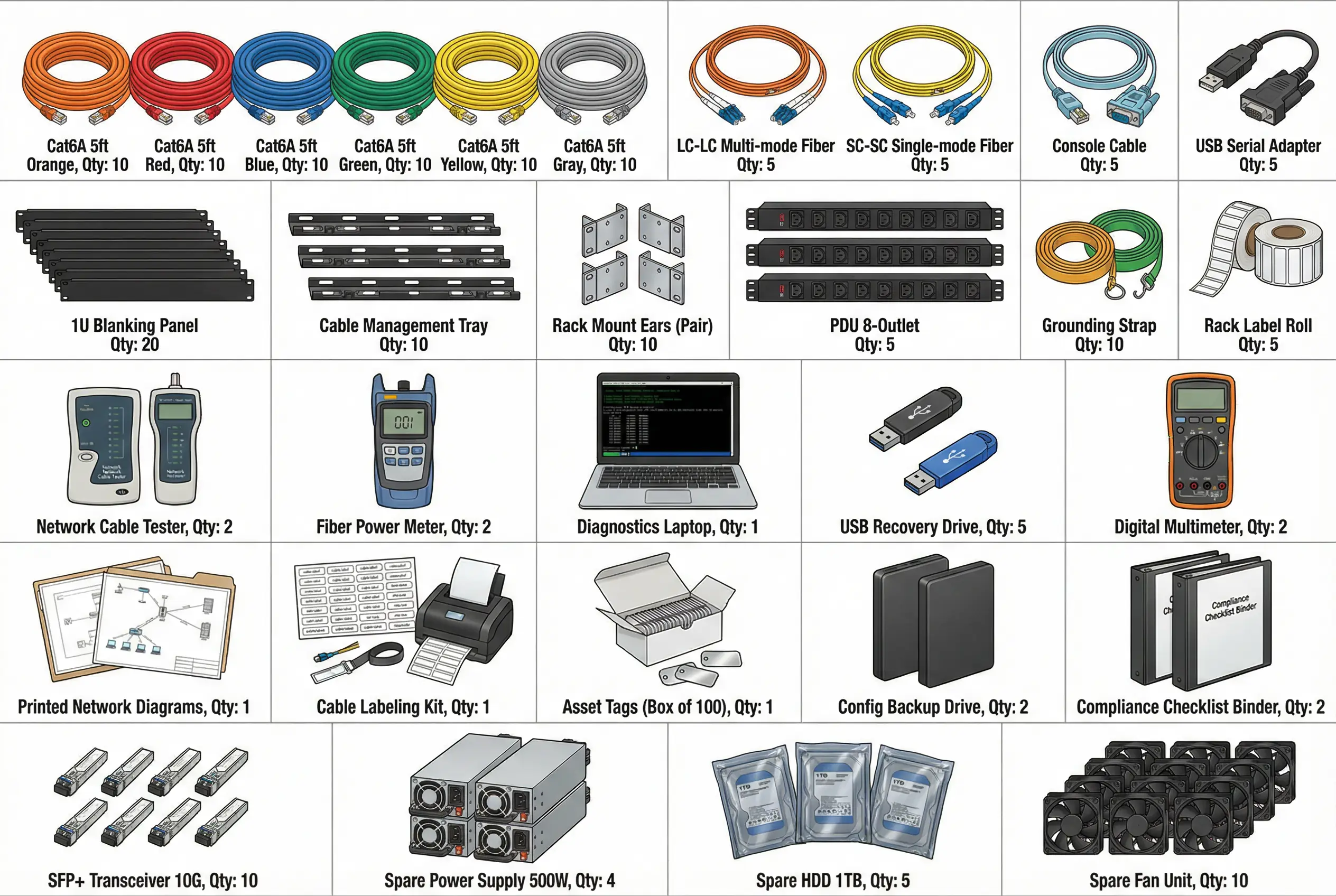
Figure 8.1: Accessories and Tools Inventory — Complete catalog showing cables (Cat6A in 6 colors, fiber optic LC-LC and SC-SC, console cables, USB serial adapters), rack hardware (blanking panels, cable trays, PDUs, grounding straps), diagnostic tools (cable tester, fiber power meter, diagnostics laptop, USB recovery drives, digital multimeter), documentation materials (network diagrams, cable labeling kit, asset tags, config backup drives, compliance binders), and spare parts (SFP+ transceivers, power supplies, HDDs, fan units).
8.1 Cables and Connectivity Materials
Cable selection and color coding are critical for operational clarity. The cable color coding standard defined in Chapter 4 must be strictly followed. All cables must be labeled at both ends with the source device, port, and destination device, port. Pre-terminated patch cables are strongly preferred over field-terminated cables for data center environments, as they provide consistent performance and reduce installation errors.
| Item | Specification | Color / Type | Quantity (Typical) | Use Case |
|---|---|---|---|---|
| Cat6A Patch Cable | Cat6A, 10GbE, 1–3m | Orange | 10 per rack | WAN / Internet uplinks |
| Cat6A Patch Cable | Cat6A, 10GbE, 1–3m | Red | 4 per HA pair | HA synchronization links |
| Cat6A Patch Cable | Cat6A, 10GbE, 1–3m | Blue | 10 per rack | Management / OOB network |
| Cat6A Patch Cable | Cat6A, 10GbE, 1–3m | Green | 20 per rack | Data plane / zone interfaces |
| Cat6A Patch Cable | Cat6A, 10GbE, 1–3m | Yellow | 8 per rack | Fiber uplink (copper side) |
| Cat6A Patch Cable | Cat6A, 10GbE, 1–3m | Gray | 10 per rack | Console / serial connections |
| Fiber Optic Cable | LC-LC, OM4 multimode, 2–5m | Aqua | 8 per rack | Short-range inter-rack fiber |
| Fiber Optic Cable | LC-LC, OS2 single-mode, 5–50m | Yellow | 4 per rack | Long-range inter-switch fiber |
| Console Cable | RJ45-DB9, 1.8m | Light blue | 1 per appliance | Serial console access |
| USB-to-Serial Adapter | USB-A to DB9, FTDI chipset | — | 2 per team | Laptop console access |
8.2 Rack Hardware and Accessories
| Item | Specification | Quantity | Purpose |
|---|---|---|---|
| 1U Blanking Panel | 19-inch, 1U, vented or solid | 20 per rack | Airflow management; fill unused rack units |
| Cable Management Tray | 1U horizontal, 19-inch | 1 per 4U of patching | Organize patch cables; prevent cable sag |
| Rack Mount Ears | Matching appliance vendor | 1 pair per appliance | Secure appliance in rack |
| PDU (Power Distribution Unit) | 8-outlet, 16A, metered | 2 per rack (A+B feed) | Redundant power distribution |
| Grounding Strap | ESD-safe, 1.8m | 2 per team | ESD protection during installation |
| Rack Label Kit | Self-adhesive, printable | 1 kit per rack | Device and port labeling |
| Velcro Cable Ties | Reusable, 20cm | 50 per rack | Bundle and organize cables |
8.3 Diagnostic Tools and Equipment
| Tool | Specification | Quantity | Use Case |
|---|---|---|---|
| Network Cable Tester | Cat6A capable, wiremap + length | 2 per team | Verify cable continuity and wiring before power-on |
| Fiber Optic Power Meter | 850nm / 1310nm / 1550nm | 2 per team | Measure fiber link loss; verify transceiver power levels |
| Diagnostics Laptop | With terminal software, Wireshark, nmap | 1 per team | Console access, packet capture, connectivity testing |
| USB Recovery Drive | 16GB+, bootable OS image | 5 per project | Emergency OS recovery for appliances |
| Digital Multimeter | AC/DC voltage, continuity | 2 per team | Verify power feed voltage; check grounding |
| Tone Generator and Probe | For copper cable tracing | 1 per team | Trace unlabeled cables in existing infrastructure |
8.4 Spare Parts Inventory
Maintaining a spare parts inventory reduces mean time to repair (MTTR) for hardware failures. The recommended spare parts list below represents a minimum viable inventory for a production deployment. Organizations with strict RTO requirements should consider maintaining hot spares (pre-configured, ready to deploy) for the most critical components.
| Spare Part | Specification | Quantity | Storage Location | Replacement Trigger |
|---|---|---|---|---|
| SFP+ Transceiver (10G SR) | 10GBase-SR, 850nm, OM3/OM4 | 10 units | On-site spares cabinet | Link failure or power below threshold |
| SFP+ Transceiver (10G LR) | 10GBase-LR, 1310nm, OS2 | 4 units | On-site spares cabinet | Link failure or power below threshold |
| Power Supply Unit | Matching appliance vendor/model | 1 per appliance model | On-site spares cabinet | PSU failure alarm |
| Hard Drive / SSD | Matching appliance vendor/model | 2 per appliance model | On-site spares cabinet | SMART failure or RAID degraded |
| Fan Module | Matching appliance vendor/model | 1 per appliance model | On-site spares cabinet | Fan failure alarm |
| Patch Cable (all colors) | Cat6A, 1m and 3m | 5 per color | On-site spares cabinet | Physical damage or test failure |
8.5 Documentation Requirements
Complete and accurate documentation is a deliverable of the implementation project, not an afterthought. The following documentation must be produced, reviewed, and stored in the organization's document management system before the project is formally closed. Documentation must be updated whenever a change is made to the system.
| Document | Contents | Owner | Review Frequency | Storage Location |
|---|---|---|---|---|
| Zone Design Document | Zone definitions, trust levels, design decisions | Security Architect | Annual + after major changes | Document management system |
| Inter-Zone Access Matrix | Approved flows for each zone pair | Security Architect | Quarterly | Document management system |
| As-Built Network Diagrams | Physical and logical topology, IP addresses | Network Engineer | After every change | Document management system + printed |
| Cable Plant Documentation | Cable labels, port assignments, patch panel maps | Network Engineer | After every change | Document management system + on-site binder |
| Device Configuration Baseline | Approved configuration for each device type | Network Engineer | After every change | Secure backup storage |
| Acceptance Test Report | Test results for all positive and negative tests | Security Architect | After each implementation phase | Document management system |
| Runbook / Operations Manual | Day-to-day operational procedures, escalation paths | Network Ops Lead | Annual | Document management system + on-site binder |
| Incident Response Playbooks | Segmentation-specific IR procedures | SOC Lead | Annual | SIEM / SOAR platform + document system |